Podman Desktop 1.28 Release
Podman Desktop 1.28 Release! 🎉

Podman Desktop 1.28 is now available. Click here to download it!
This release brings exciting new features and improvements:
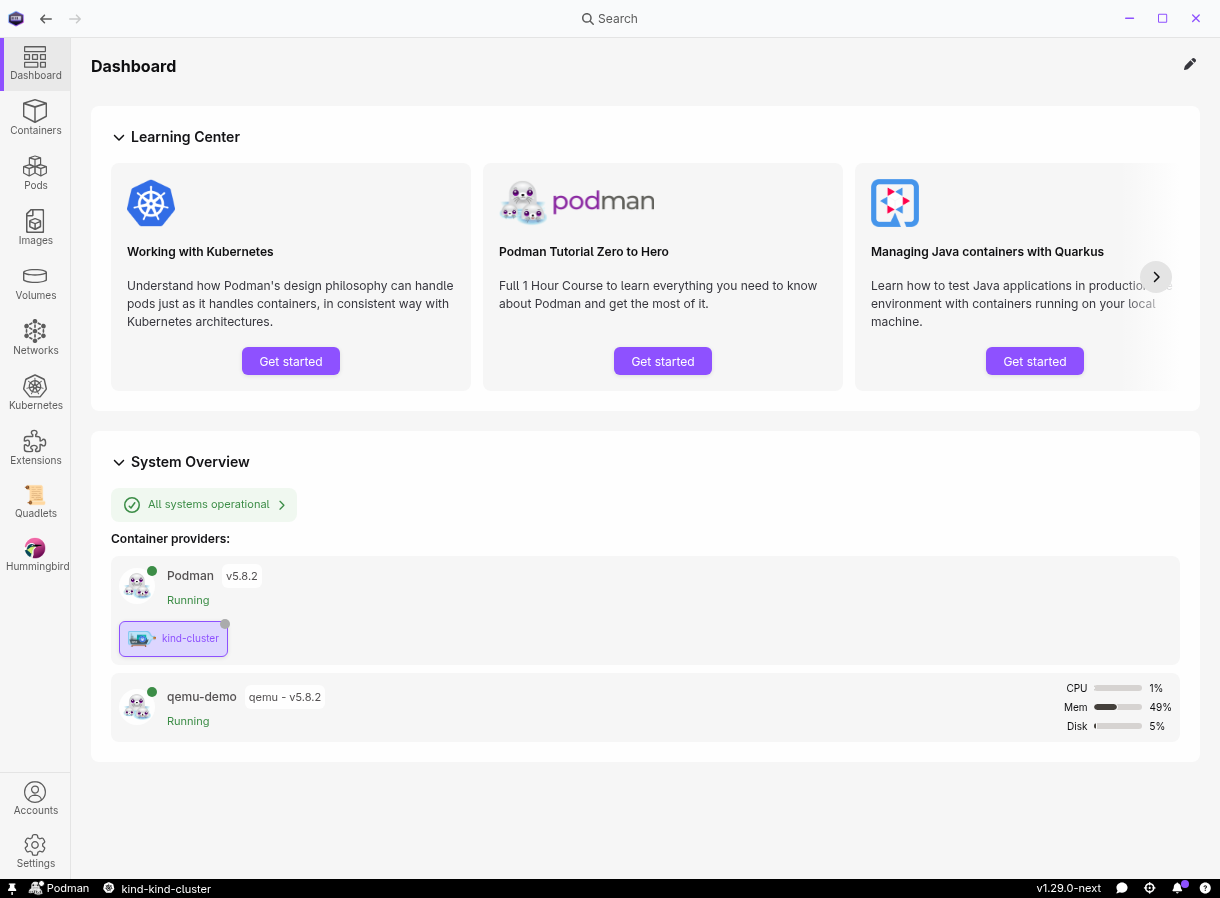
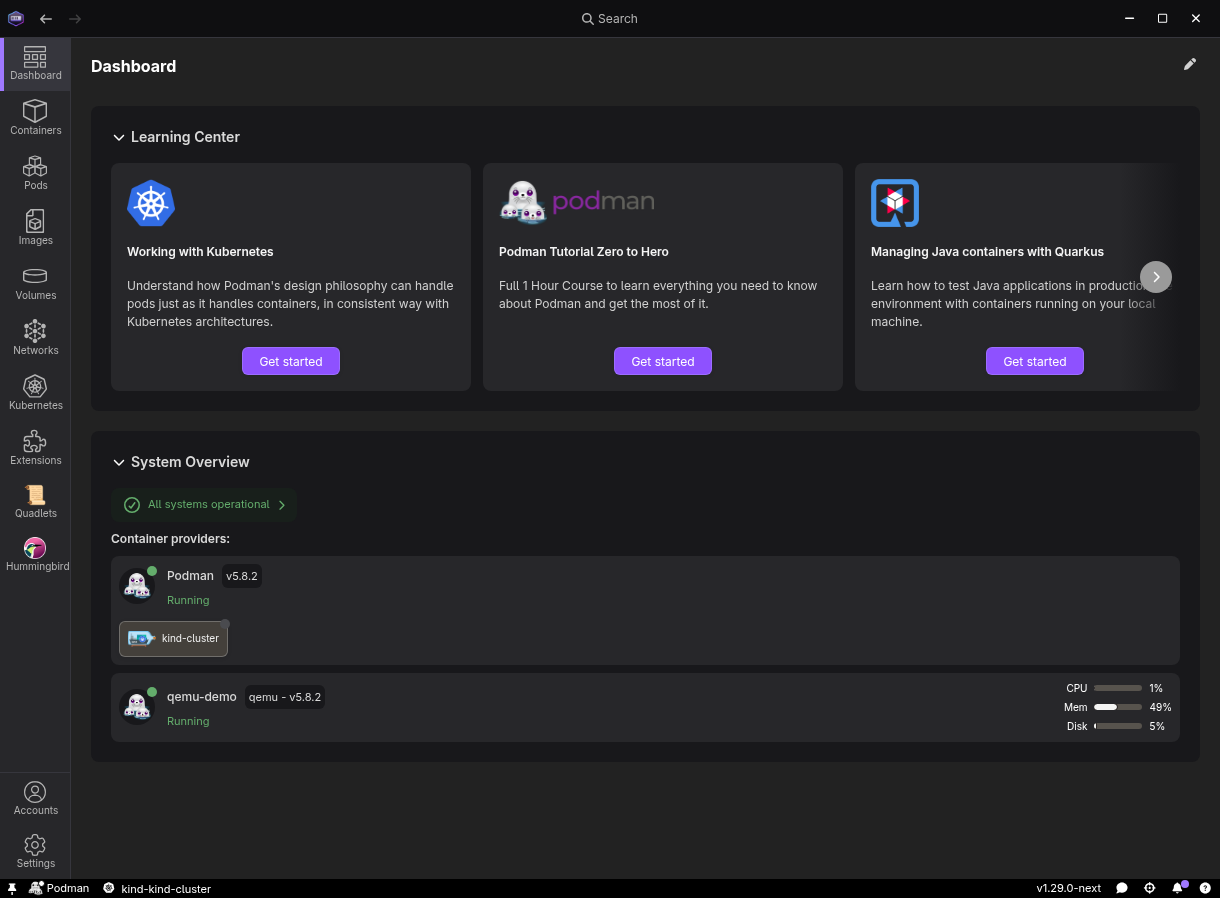
- Enhanced dashboard with system overview: The dashboard now displays a system overview with resource utilization of your container engines, giving you an at-a-glance view of CPU, memory, and disk consumption.
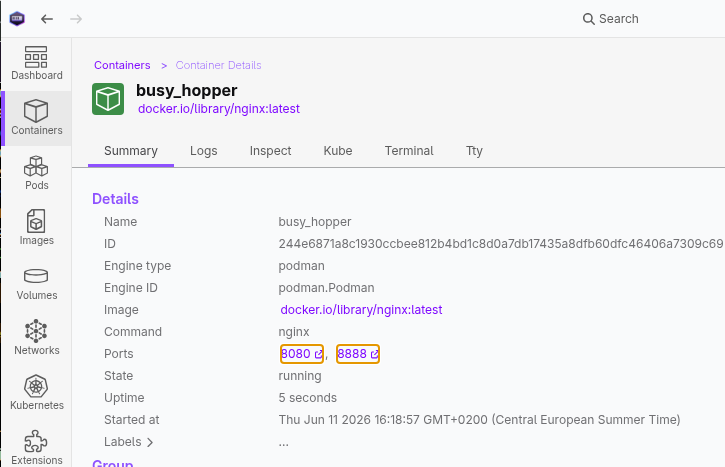
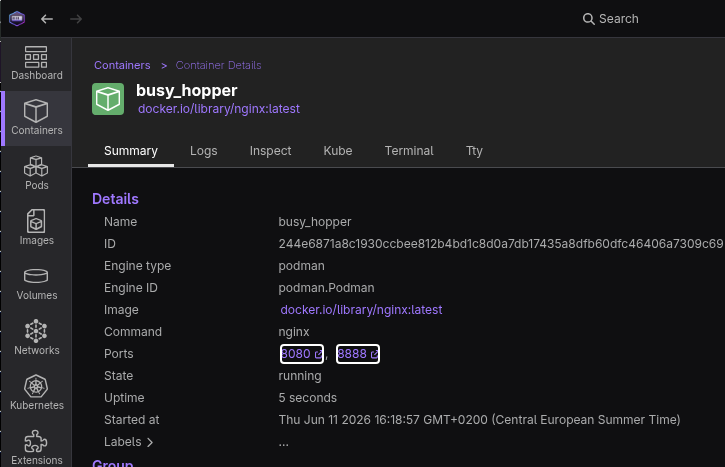
- Clickable container ports: Mapped ports in the container details summary are now clickable links that open directly in your browser.
- Page restoration after reload: Reloading the application now restores your current page instead of navigating back to the dashboard.
- Extension installation progress: Installing extensions now shows real-time download progress in the Task Manager.
- Podman update: Podman 5.8.3
- Security updates: Multiple CVE vulnerabilities resolved in Podman Desktop and its dependencies to ensure a safer work environment.
Release details
Enhanced dashboard with system overview
The dashboard has been redesigned with a new system overview section that shows resource usage for your container engine connections. At a glance, you can see CPU, memory, and disk usage for each running provider, making it easier to monitor your development environment without leaving the main page.
The new design is currently behind an experimental flag, you can enable it by navigating to Settings > Experimental Features and enable Dashboard enhanced dashboard. You can share your feedback on the dedicated GitHub discussion Enhanced Dashboard #16055
Clickable container ports
Each mapped port in the container details Summary pane is now rendered as a clickable link. Clicking a port opens http://localhost:<port> in your default browser, with a tooltip showing the full URL. This removes the need to manually copy port numbers and type URLs.
Managed-by indicator on Resources page
When a provider has locked configuration settings via managed configuration, the Resources page now shows a "Managed" indicator with a lock icon. This makes it clear which preferences are centrally managed by IT administrators.


Page restoration after reload
Previously, reloading the application with Ctrl+R (or Cmd+R on macOS) would send you back to the dashboard. Podman Desktop now remembers your current page and restores it after a reload, so you can refresh without losing your place.
Improved dialog UX
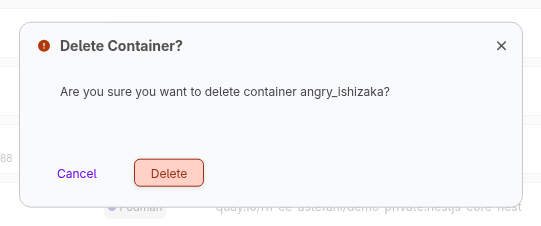
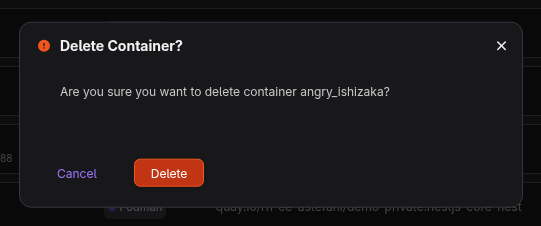
Confirmation dialogs throughout the application have been standardized with action-oriented titles and buttons. Instead of generic "Yes/No" buttons, dialogs now use specific verbs like "Prune", "Delete", "Uninstall", or "Clean Up" making it clearer what action you are confirming.
Provider lifecycle error propagation
Kind and Lima provider connections now display lifecycle errors directly in the connection status. When a provider encounters an error during start, stop, or other lifecycle operations, the error message is propagated to the connection UI for immediate visibility.
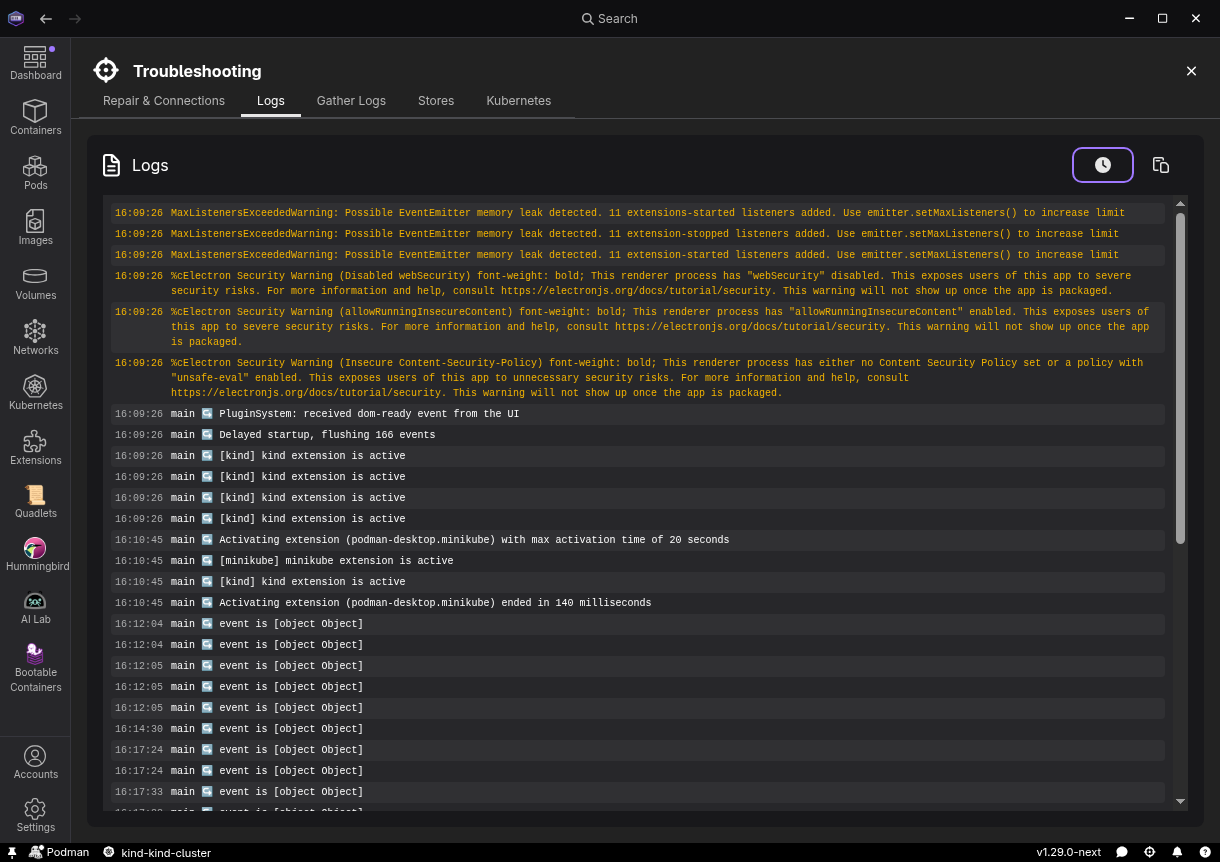
Troubleshooting log timestamps
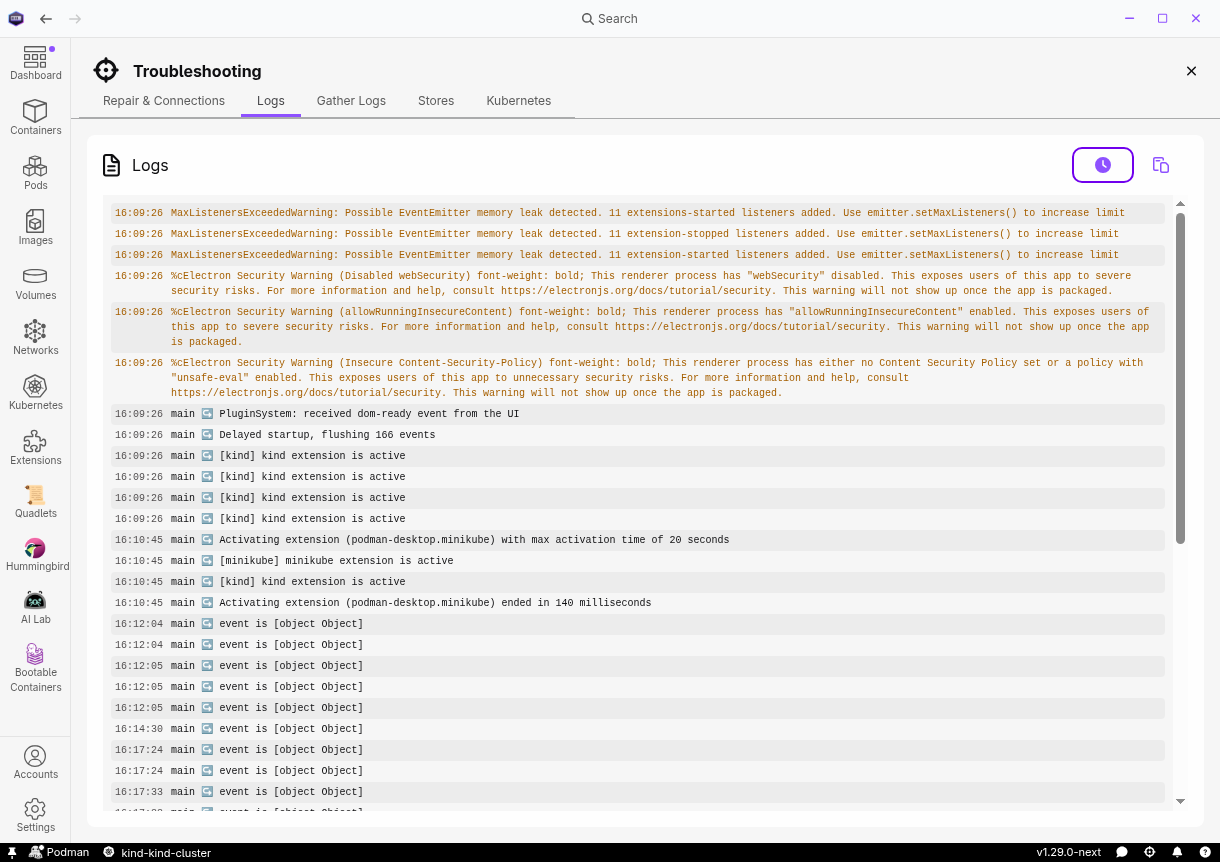
The Troubleshooting logs page now supports optional timestamps on each log entry. Toggle the clock icon to show or hide timestamps, with the preference persisted across sessions. When enabled, the clipboard copy format includes the timestamp as well.
Extension development improvements
@podman-desktop/api-mockspackage: A new npm package that auto-generates vitest mocks for@podman-desktop/api, eliminating the need for extensions to maintain their own mock files.$schemareference in extension manifests: Built-in extensions now include a$schemareference in theirpackage.jsonfor better autocomplete and validation during development.- Volume menu context contributions: Extensions can now contribute custom menu entries to volume context menus, following the same pattern used for pods, containers, and images. (See Extensions > Developing > Menus)
Community thank you
🎉 We'd like to say a big thank you to everyone who helped to make Podman Desktop even better. In this release we received pull requests from the following people:
- AlexonOliveiraRH in feat: add scrollable left navigation bar
- tibisabau in feat(extensions): add support menu context contribution for volumes
- AkashKumar7902 in fix(ui): capitalize Password in registry settings
- sAchin-680 in feat(api-mocks): add @podman-desktop/api-mocks npm package and more
Community meeting
If you would like to discuss any of the new features, issues or other topics, please join us at the monthly community meeting that takes place every 4th Thursday of the month. Here are the meeting details.
Final notes
The complete list of issues fixed in this release is available here.
Get the latest release from the Downloads section of the website and boost your development journey with Podman Desktop. Additionally, visit the GitHub repository and see how you can help us make Podman Desktop better.
Detailed release changelog
feat
- feat(lima): propagate errors to connection error property by @JustMell0 #17717
- feat(storybook): add comprehensive stories for StatusDot component by @vancura #17711
- feat(color-registry): add the yellow Tailwind 4 color ramp by @vancura #17701
- feat(storybook): add statusbar tooltip contexts to Spinner and load FontAwesome CSS by @vancura #17677
- feat(renderer): add managed-by indicator on resource page by @cdrage #17627
- feat(kind): propagate lifecycle errors to connection error property by @JustMell0 #17654
- feat: add theme-aware icon component by @fbricon #17585
- feat(skills): add component-modernization and storybook-hmr skills by @vancura #17576
- feat(skills): add storybook screenshot and video recording skills by @vancura #17575
- feat(skills): add prototype-switcher skill for UX prototyping by @vancura #17574
- feat: add issue-requirements skill and gh CLI permissions by @amisskii #17549
- feat(storybook): add toast notification stories by @vancura #17531
- feat(ui): add keyboard focus support to tooltip by @vancura #17520
- feat(storybook): add comprehensive stories for LinearProgress component by @vancura #17504
- feat(tray): add option to hide system tray icon by @JustMell0 #17491
- feat(container): make mapped ports clickable in summary to open browser by @simonrey1 #17435
- feat(renderer): modernize ProgressBar component by @vancura #17422
- feat(storybook): add comprehensive stories for ProgressBar component by @vancura #17417
- feat(main): add --pd-toast-* color registry variables and wire them to ToastHandler by @vancura #17391
- feat(renderer): add timestamps to troubleshooting logs page by @simonrey1 #17322
- feat(extension-api): add Arch property to ImageInfo by @JustMell0 #17323
- feat(api-mocks): add @podman-desktop/api-mocks npm package by @sAchin-680 #17309
- feat(renderer): add telemetry tracking to SystemOverviewCard by @JustMell0 #17298
- feat(main): wire download progress into task during extension installation by @simonrey1 #17295
- feat(main): create a task when installing an extension by @simonrey1 #17292
- feat: implement restoring the page after reload by @dgolovin #17261
- feat(SystemOverview): changed ordering on the dashboard page by @gastoner #17240
- feat(extensions): add $schema reference to extension package.json files by @simonrey1 #17183
- feat: added support for error property in connections by @gastoner #17117
- feat(SystemOverview): added resource usage to SystemOverview component by @gastoner #16999
- feat(extensions): add support menu context contribution for volumes by @tibisabau #16313
- feat: add scrollable left navigation bar by @AlexonOliveiraRH #16294
- feat(SystemOverview): added system overview component by @gastoner #16111
fix
- fix(colors): sync warning colors from amber to yellow for deuteranopia accessibility by @vancura #17742
- fix(renderer): use correct CSS variables for extension download button by @vzhukovs #17699
- fix(statusbar): size FA icons via --fa-width custom property by @vancura #17695
- fix(toast): improve message toast visuals, add icons by @vancura #17681
- fix(main): make internal JSONEvent status and id optional by @simonrey1 #17659
- fix(extensions/podman): throttle socket disguise failure telemetry by @simonrey1 #17657
- fix: updated spacing of connections by @gastoner #17652
- fix: resolve CVE-2026-8723 in qs by @benoitf #17651
- fix: resolve CVE-2026-45736 in ws by @benoitf #17638
- fix: resolve CVE-2026-44705 in tmp by @benoitf #17635
- fix(renderer): add duplicate volume name validation on create form by @amisskii #17631
- fix(renderer): remove doubled "Error:" prefix in deletion error dialogs by @vzhukovs #17615
- fix(ui): add keyboard navigation to Link component by @JustMell0 #17611
- fix(podman): disable PowerShell profile loading when executing checks on Windows by @dgolovin #17606
- fix(main): use fetch instead of got for extensions catalog to respect proxy settings by @dgolovin #17599
- fix: toolbar buttons use semantic color tokens instead of button-primary-bg by @vancura #17588
- fix(renderer): clear saved route after one-shot restoration by @fbricon #17550
- fix(renderer): hide Open Pod button when kubernetes-dashboard feature is active by @feloy #17539
- fix(flatpak): update bugtracker URL to current GitHub organisation by @dgolovin #17512
- fix(renderer): mark wheel event listener as passive by @JustMell0 #17509
- fix: resolve CVE-2026-44293 in protobufjs by @benoitf #17492
- fix: resolve CVE-2026-41150 in mermaid by @benoitf #17483
- fix(renderer): use disconnect() for ResizeObserver cleanup in onDestroy by @vzhukovs #17473
- fix: resolve CVE-2026-44728 in @babel/plugin-transform-modules-systemjs by @benoitf #17450
- fix: resolve CVE-2026-6321 in fast-uri by @benoitf #17449
- fix(tests): use vi.mocked for getUrlProtocol in PreferencesRenderingItem.spec by @dgolovin #17448
- fix(renderer): prevent duplicate markdown rendering for type: markdown preferences by @MarsKubeX #17444
- fix(renderer): detect untagged images as in-use via ImageID by @JustMell0 #17433
- fix(renderer): show error dialog when network deletion fails by @simonrey1 #17432
- fix: add fallback implementation to detect when window should be showed up on linux by @dgolovin #17428
- fix: resolve CVE-2026-42338 in ip-address by @benoitf #17426
- fix(renderer): nest provider routes under /resources to fix unresponsive navigation by @simonrey1 #17421
- fix(main): reset corrupt safe storage file after backup by @simonrey1 #17419
- fix: cleanup watchers on stop by @benoitf #17403
- fix(renderer): use theme token for markdown heading border by @vancura #17398
- fix(storybook): replace text-white with color-registry token in Spinner story by @vancura #17396
- fix(renderer): show error feedback when volume creation fails by @simonrey1 #17394
- fix(renderer): restore explore features section after page refresh by @simonrey1 #17333
- fix(main): propagate event stream parser errors to trigger reconnection by @simonrey1 #17332
- fix(main): clarify feedback dialog setting description by @JustMell0 #17320
- fix(podman-docker-context): use unique docker context names on Linux by @JustMell0 #17300
- fix(deps): use caret range for TypeScript in root package.json by @simonrey1 #17286
- fix(storybook): skip chokidar watcher during vitest runs by @simonrey1 #17288
- fix: replace shadow-black with --pd-modal-shadow color registry variable by @sAchin-680 #17280
- fix(main): use product appId for Windows AppUserModelId by @simonrey1 #17278
- fix(extensions): skip registering commands and menus for disabled extensions by @JustMell0 #17276
- fix: resolve CVE-2026-41305 in postcss by @benoitf #17267
- fix(ui): capitalize Password in registry settings by @AkashKumar7902 #17262
- fix: resolve GHSA-w5hq-g745-h8pq in uuid by @benoitf #17239
- fix(api): support Docker API v1.52+ event format by @simonrey1 #17231
- fix(watch): wait for build completion in getWatcher by @JustMell0 #17226
- fix(website): invalid path in image by @axel7083 #17216
- fix(extensions): sync CLI tool version to provider on startup by @simonrey1 #17209
- fix(ui): replace raw tailwind color with design token in ListOrganizer by @vancura #17152
- fix(ui): increase spinner segment opacity for better contrast by @vancura #17145
chore
- chore(telemetry): reduce the shellInContainer.error event to only once per day by @benoitf #17705
- chore: use package.json repository to hide or show GitHub link in feedback form by @SoniaSandler #17737
- chore(ci): updated tf fedora versions by @gastoner #17719
- chore: fix lock file by @benoitf #17763
- chore(extensions): add repository and homepage metadata by @simonrey1 #17658
- chore: fix CVE-2026-9277 in shell-quote by @rujutashinde #17639
- chore(ci): update node version on tf runners by @amisskii #17633
- chore(deps): update to yauzl: '^3.3.1' for electron install by @cdrage #17623
- chore(deps): fix duplicate entry lockfile by @cdrage #17476
- chore(deps-dev): remove postcss override (dependabot will handle updates) by @simonrey1 #17580
- chore: add trigger for update e2e tests for general code changes by @odockal #17562
- chore: move learning center guides JSON to product.json by @SoniaSandler #17548
- chore: use product name for update reminder preference by @SoniaSandler #17547
- chore: use extensions catalog website from product.json for extensions update preference by @SoniaSandler #17546
- chore(ci): update podman-install action digest by @odockal #17489
- chore: add configuration properties override option in product.json by @SoniaSandler #17477
- chore(kind): remove tmp-promise dependency and replace with Node.js builtins by @sAchin-680 #17275
- chore(SystemOverview): added aria labels to SystemOverview elements by @gastoner #17392
- chore(eslint): enable vitest/prefer-mock-return-shorthand by @axel7083 #17397
- chore(main): show experimental enhanced dashboard setting by @gastoner #17246
- chore(website): update links of socktainer by @benoitf #17345
- chore(eslint): enable vitest/prefer-mock-promise-shorthand by @axel7083 #17212
- chore(deps): bump docusaurus to 3.10 by @axel7083 #17217
- chore(e2e): move manifest push scenario to simple containerfile block by @amisskii #16892
- chore(fix): access warnings by @ScrewTSW #17319
refactor
- refactor(ui): modernize LinearProgress component by @vancura #17505
- refactor(ui): move ProgressBar component from renderer to packages/ui by @vancura #17424
- refactor(ui): replace hardcoded shadow rgba with color-registry tokens by @vancura #17399
- refactor(extensions): omit version argument to clear provider version by @simonrey1 #17372
- refactor(api): allow updateVersion to accept undefined by @simonrey1 #17371
- refactor: update main package tests to use mocked product.json values by @SoniaSandler #17336
- refactor(renderer): extract expandable collapse/expanded logic by @sAchin-680 #17279
- refactor(renderer): use consistent titles and buttons for delete/remove confirmation dialogs by @vancura #17204
- refactor(extensions): create shared vite config for extensions by @JustMell0 #17192
- refactor(main): use consistent titles and messages for updater dialogs by @vancura #17186
- refactor(renderer): use verb-noun titles for error and info dialogs by @vancura #17184
- refactor(renderer): use consistent titles and buttons for confirmation and action dialogs by @vancura #17181
- refactor(renderer): add title support and verb-derived buttons to withConfirmation utility by @vancura #17178
- refactor(renderer): require action-oriented titles for bulk confirmation dialogs by @vancura #17255
- refactor(renderer): replace generic button labels with action verbs by @vancura #17256
- refactor(renderer): remove icon from TroubleshootingPageStoreDetails dialog by @vancura #17257
- refactor(renderer): fix button order in create container dialog by @vancura #17258
- refactor(onboarding): replace bg-black with color-registry variable by @vancura #17157
- refactor(network): replace raw Tailwind colors with color-registry tokens in CreateNetwork by @vancura #17155
- refactor(ui): replace hardcoded tailwind colors in ProviderInfoCircle with color-registry tokens by @vancura #17153
- refactor(ui): use color-registry token in SearchInput search icon by @vancura #17151
- refactor(renderer): remove obsolete Tailwind colors in auth providers by @vancura #17138
- refactor(preferences): add color-registry token to PreferencesKubernetesContextsRendering by @vancura #17137
- refactor(extensions): replace divide-gray-900 with color-registry token in InstalledExtensionCard by @vancura #17136
- refactor(color-registry): replace hover:text-white with color-registry token in WindowsControlButton by @vancura #17135
- refactor(Connections): switched to canStart boolean by @gastoner #17247
- refactor(ci): use official download artifact action by @sAchin-680 #17475
test
- test(e2e): fix k8s e2e tests failing on azure wsl machines by @danivilla9 #17649
- test(e2e): enable/disable enhanced dashboard experimental feature by @danivilla9 #17596
- test(e2e): add managed configuration test for custom extensions toggle by @ScrewTSW #17318
- test: add interactive MCP testing skill for Podman Desktop by @amisskii #16759
- chore(test): increase robustness in container podify checkbox by @cbr7 #17776
- chore(test): refactor volume path reading method by @cbr7 #17687
- chore(test): remove docker images from github runner before test run by @cbr7 #17683
- chore(test): add breadcrumb validation e2e tests by @cbr7 #17648
- chore(test): additional logging when running cli commands by @cbr7 #17632
- chore(test): initial draft for stubbing method for apply yaml by @cbr7 #17608
- chore(test): create sync certificate e2e test suite by @cbr7 #17514
- chore(test): address review feedback for container export/import e2e test by @cbr7 #17506
- chore(test): add import/export container e2e test by @cbr7 #17499
- chore(test): fix broken test using wrong button name by @cbr7 #17374
- chore(test): add parametrized extension installation by @cbr7 #17373
- chore(test): adjust tests for cdp runner and downstream variation by @odockal #17331
- chore(test): update network-smoke container state expectation by @odockal #17260
- chore(test): update the k8s dialog and confirm dialog handling by @odockal #17244
- chore(fix): normalize saveImage abort error across Node.js versions by @cbr7 #17234
- chore(test): fixing test to pass on macos by @cbr7 #17233
- fix(test): update feedback dialog toggle label to match renamed description by @ScrewTSW #17508